One of the more amusing details about MCP Apps is that they've brought the humble iframe back into the spotlight.
Yes, the iframe. That awkward little piece of HTML we've spent years trying to avoid whenever possible. The thing you occasionally encounter in an old codebase and quietly wonder whether removing it is worth the trouble.
And now, here it is, playing an important role in how AI applications embed interactive interfaces.
I find that rather funny. We've spent so much time improving how we build and integrate frontend components, only to discover that one of the oldest browser features might be particularly well suited to a problem we're only beginning to deal with.
Although, to be fair, the iframe never really went anywhere.
We didn't hate iframes for no reason
Iframes have always been useful for embedding things we don't control. YouTube videos, payment forms, advertising, third-party widgets. They've been doing that job for ages.
I'm not speaking hypothetically. At finmid, where I work, iframes are how we get financing in front of businesses. Our lending flow is embedded inside the platforms those businesses already use, so they can apply for a loan without leaving the software they run their company on. The iframe is how our product shows up inside someone else's product. Real money moves through it every day. For us, it isn't a legacy curiosity. It's load-bearing.
The trouble starts when you try to use them as ordinary application components.
Anyone who's worked with embedded interfaces knows the annoyances. Getting the height right, coordinating navigation, sharing state, handling focus, synchronising styles, and communicating between frames. None of these problems is particularly exciting, and some are surprisingly irritating.
Modern frontend frameworks made it much easier to compose interfaces without dealing with all that. Why embed an entire document when you can render a React component?
For applications where you control the code on both sides, that's generally a reasonable argument.
But what happens when you don't control the code?
That's where MCP Apps made me reconsider the whole thing.
When your tools bring their own frontend
The MCP Apps extension lets MCP servers provide interactive interfaces alongside their tools.
Imagine asking an AI assistant to show you outstanding invoices. Instead of returning a wall of text, the tool provides an interface with a sortable table, filters, and buttons for inspecting individual invoices.
You can interact with it directly inside the conversation. No need to ask the model to sort the results again every time you click something.
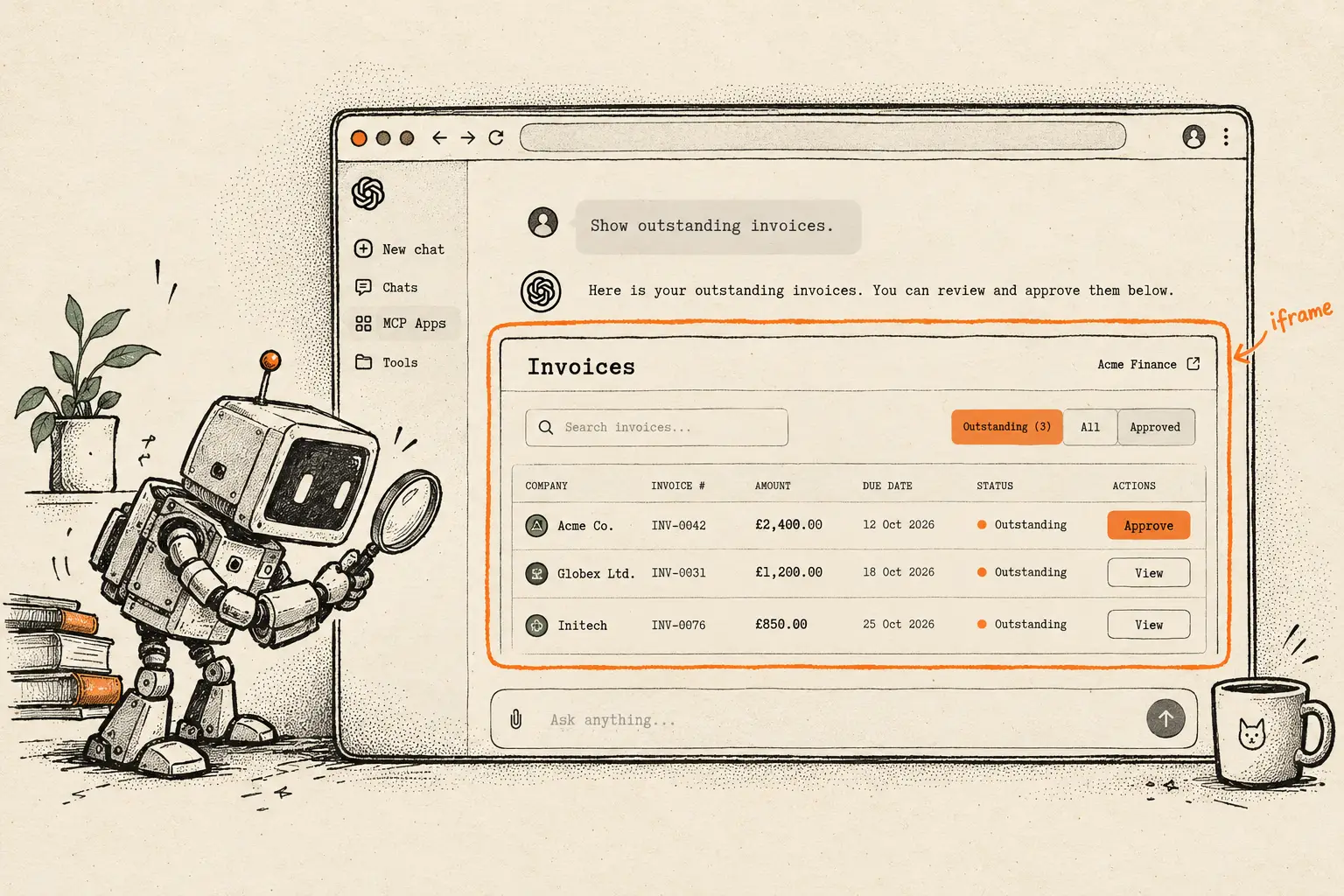
The interesting detail is how that interface gets there.
An MCP tool can reference a ui:// resource containing HTML and JavaScript. The host retrieves that resource and renders it inside a sandboxed iframe. The interface then communicates with the host through JSON-RPC messages over postMessage.
It's worth clarifying something here. MCP Apps don't inherently mean an AI model is generating arbitrary HTML on every request. The interface is normally provided by the MCP server as a declared resource. The model might decide when to invoke the tool, but it isn't necessarily writing the frontend.
Still, the result is quite different from a conventional application.
Your host might be ChatGPT, Claude, or another compatible client. The interface comes from a separate server, potentially developed by someone completely unrelated to the host.
You now have one application displaying executable frontend code supplied by another application.
And that changes what we should care about.
Suddenly, isolation sounds quite appealing
If I'm building a dashboard and need a date picker, I'll use a component. I know where the code comes from, I can review it, and I have some control over what it does.
But suppose an external MCP server wants to display its own interface inside my application.
I don't particularly want its JavaScript accessing my DOM, reading application state, or interacting with anything I haven't explicitly allowed.
This is exactly the kind of problem iframes were designed to help with.
A properly isolated iframe has its own document and security context. Browser origin rules restrict access to the parent application, while sandboxing can limit additional capabilities.
MCP Apps build on this with a more deliberate communication model.
For web hosts, the specification even requires an intermediate sandbox proxy running on a different origin from the host. The embedded UI communicates through that boundary rather than receiving direct access to its surroundings.
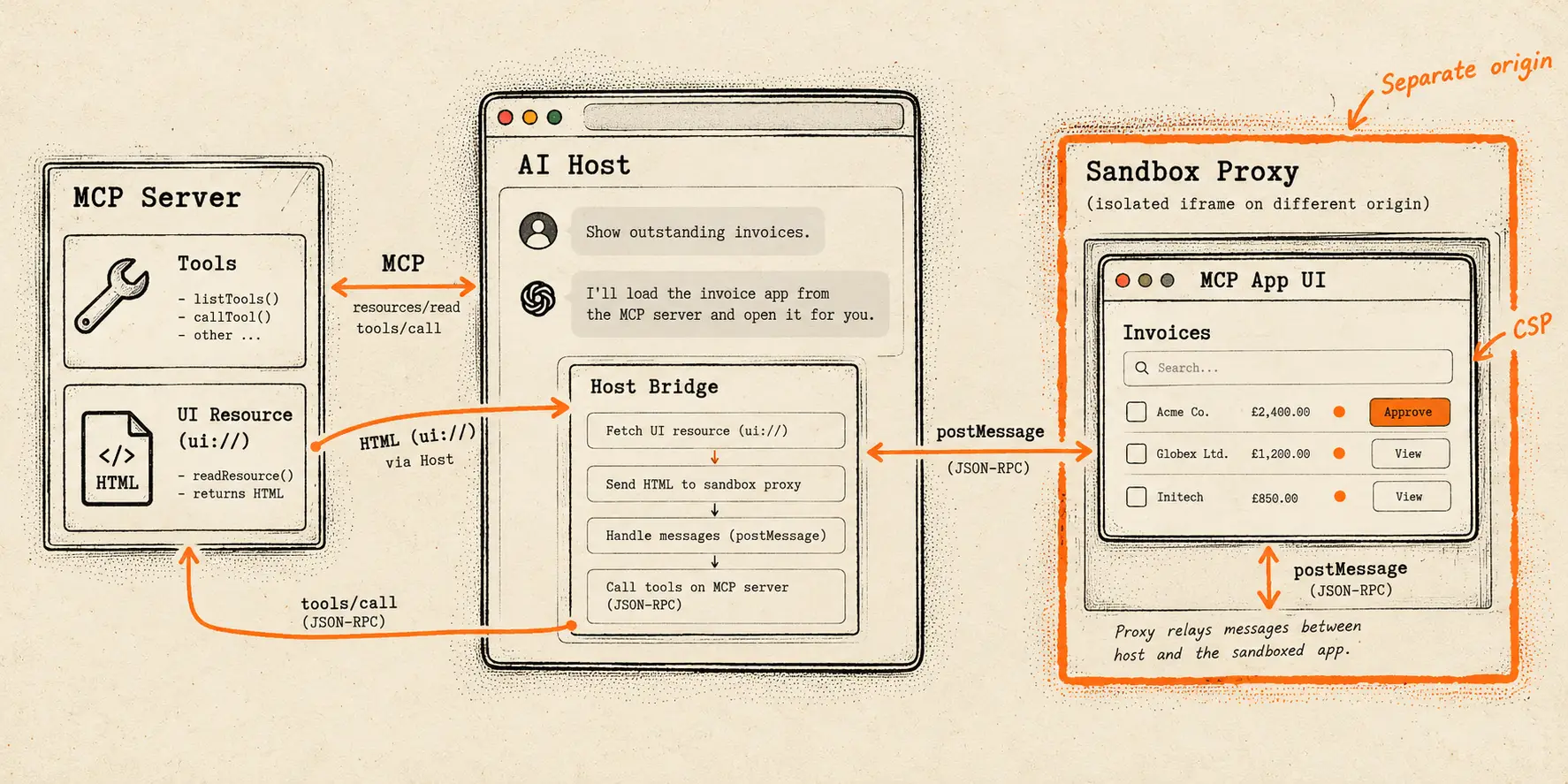
Servers also declare external domains their interfaces need to contact, and hosts enforce those restrictions through Content Security Policy. By default, external network connections aren't allowed.
The iframe can request that the host call a tool, but the host remains responsible for deciding whether that request is permitted.
That's quite a lot of security machinery built around something we used to embed videos of cats.
And I think it makes sense.
The iframe isn't a magic security blanket
Of course, putting something inside an iframe doesn't automatically make it safe.
An embedded application could still display misleading information, trick someone into clicking a button, or request an action it shouldn't be allowed to perform.
Imagine our invoice interface includes an Approve button. The iframe might prevent the embedded JavaScript from interfering with the parent application, but it doesn't determine whether approving that invoice is legitimate.
That responsibility sits elsewhere.
The host needs to validate messages, enforce tool permissions, and potentially request user confirmation before allowing sensitive operations. The server still needs proper authentication and authorisation.
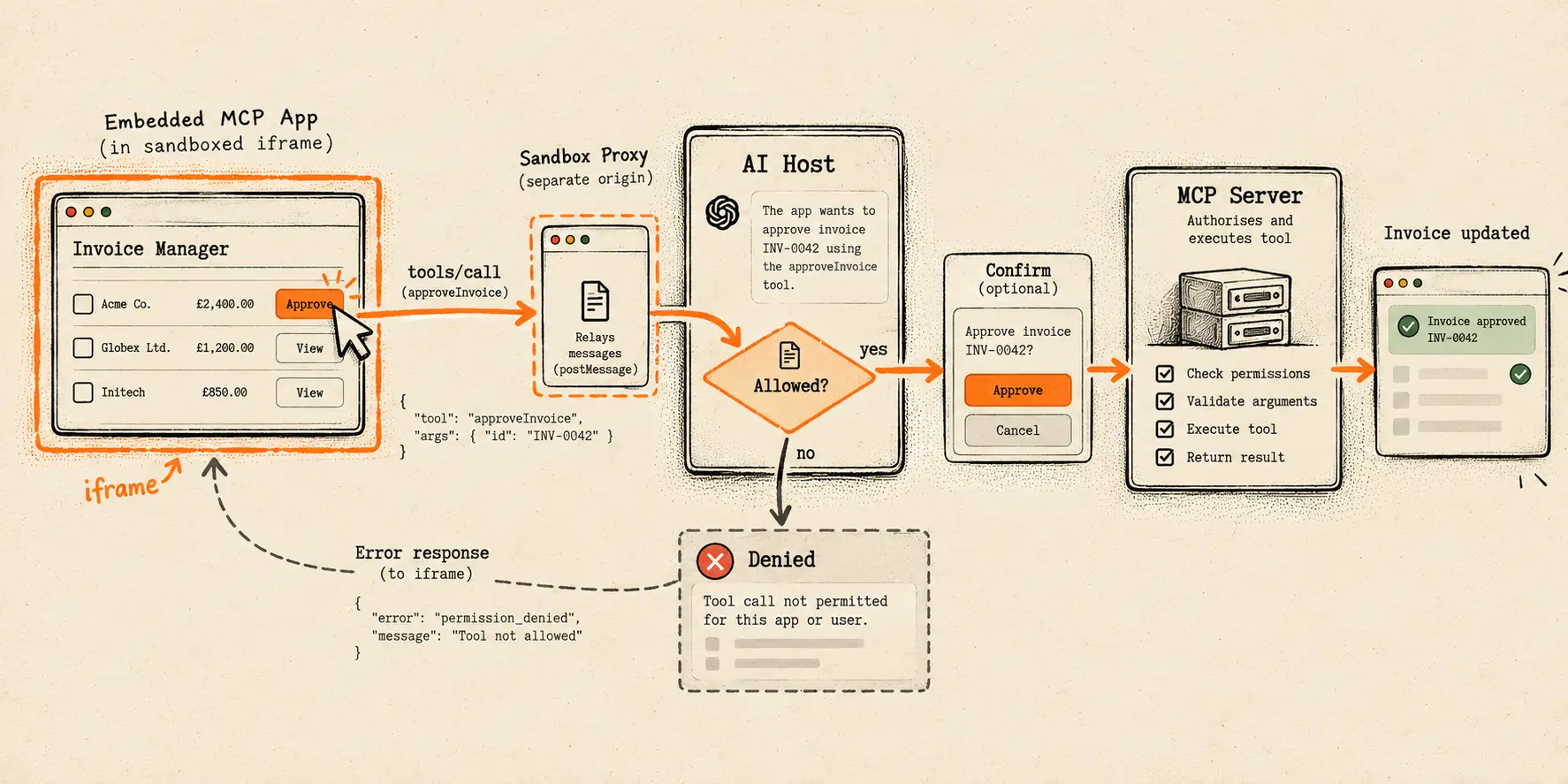
And if an app is allowed to communicate with external services, those permissions deserve scrutiny too.
The iframe provides an isolation boundary, not a guarantee that everything happening inside it is trustworthy.
There's also the small matter of usability.
Embedded interfaces still have to deal with sizing, focus, keyboard accessibility, responsiveness, and communication overhead. Different hosts may support different capabilities. Something that feels perfectly integrated in one application might behave rather differently in another.
The iframe hasn't magically become pleasant to work with. We've just found a situation where its advantages might justify the awkwardness.
Could this be useful beyond AI?
This is the part I find particularly interesting.
MCP Apps have a fairly specific use case, but the underlying problem isn't unique to AI.
We increasingly build applications that integrate functionality from other systems. Sometimes that means APIs. Sometimes it means shared components. Occasionally, we want another system to provide an entire interactive experience without giving it access to our application internals.
Plugin systems, extensible developer tools, third-party administration interfaces, and embedded business workflows all face variations of this problem.
Of course, some already use iframes. This isn't a newly discovered architectural pattern.
What's interesting about MCP Apps is that they give the pattern a standard interface. A tool can declare its UI, the host can render it, and both sides can communicate through a defined protocol rather than everyone inventing their own collection of postMessage events.
Whether that becomes useful outside conversational AI is an open question. Standardising the boundary seems valuable, but it also introduces another protocol and another set of integration constraints.
For plenty of applications, an API and a normal frontend component will remain much simpler.
And that's fine.
I don't expect to start wrapping every React component in an iframe. I'd quite like to keep my sanity, and I suspect the rest of my team would appreciate that too.
But if the next component comes from a server I don't control, runs JavaScript I haven't reviewed, and wants to perform actions inside my application?
I might actually be happy to see an iframe.
Didn't expect to say that.